


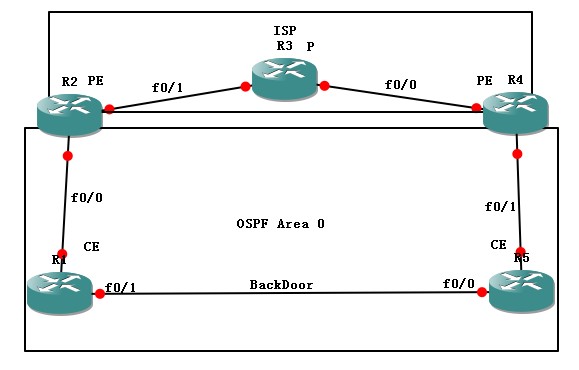
1.背景介绍.
一般我们在部署MPLS VPN的时候通常是单一的链路.而在该环境中两端CE中间存在一个后门链路.通常作为备份链路去使用.但是如果在部署MPLS VPN的时候,CE与PE使用的是OSPF协议,那么会存在一系列的问题.例如我们知道,即使你的两端CE所在OSPF的同一区域,但是也不会学到O的路由,任然会学到一条OIA的路由.这个问题会导致我们的OSPF选路产生问题.既然企业选择了MPLS VPN,那么当然想让CE间的数据通过MPLS VPN链路去传输,而如果MPLS VPN链路断了,那么再去选择备份链路去走.我们通过建立sham-link链路达到要求.此内容也为CCIE R&S 4.0考点.
2.一般情况下部署MPLS VPN.(配置文件不列出来了,太多了.这里只做验证,和重要命令的解释.)结果如下:
这里先断开R1 R5间链路.
R1#sh ip route
Codes: C - connected, S - static, R - RIP, M - mobile, B - BGP
D - EIGRP, EX - EIGRP external, O - OSPF, IA - OSPF inter area
N1 - OSPF NSSA external type 1, N2 - OSPF NSSA external type 2
E1 - OSPF external type 1, E2 - OSPF external type 2
i - IS-IS, su - IS-IS summary, L1 - IS-IS level-1, L2 - IS-IS level-2
ia - IS-IS inter area, * - candidate default, U - per-user static route
o - ODR, P - periodic downloaded static route
Codes: C - connected, S - static, R - RIP, M - mobile, B - BGP
D - EIGRP, EX - EIGRP external, O - OSPF, IA - OSPF inter area
N1 - OSPF NSSA external type 1, N2 - OSPF NSSA external type 2
E1 - OSPF external type 1, E2 - OSPF external type 2
i - IS-IS, su - IS-IS summary, L1 - IS-IS level-1, L2 - IS-IS level-2
ia - IS-IS inter area, * - candidate default, U - per-user static route
o - ODR, P - periodic downloaded static route
Gateway of last resort is not set
C 192.168.12.0/24 is directly connected, FastEthernet0/0
1.0.0.0/32 is subnetted, 1 subnets
C 1.1.1.1 is directly connected, Loopback0
O IA 192.168.45.0/24 [110/11] via 192.168.12.2, 00:00:15, FastEthernet0/0
5.0.0.0/32 is subnetted, 1 subnets
O IA 5.5.5.5 [110/21] via 192.168.12.2, 00:00:08, FastEthernet0/0
我们会发现虽然所以路由器都在OSPF的Area 0 (ISP内部运行IS-IS)
1.0.0.0/32 is subnetted, 1 subnets
C 1.1.1.1 is directly connected, Loopback0
O IA 192.168.45.0/24 [110/11] via 192.168.12.2, 00:00:15, FastEthernet0/0
5.0.0.0/32 is subnetted, 1 subnets
O IA 5.5.5.5 [110/21] via 192.168.12.2, 00:00:08, FastEthernet0/0
我们会发现虽然所以路由器都在OSPF的Area 0 (ISP内部运行IS-IS)
但是R1仍然会通过MPLS VPN学到OIA的5.5.5.5的路由.
现在我们将R1-R5直连链路no shutdown
R1#sh ip route
Codes: C - connected, S - static, R - RIP, M - mobile, B - BGP
D - EIGRP, EX - EIGRP external, O - OSPF, IA - OSPF inter area
N1 - OSPF NSSA external type 1, N2 - OSPF NSSA external type 2
E1 - OSPF external type 1, E2 - OSPF external type 2
i - IS-IS, su - IS-IS summary, L1 - IS-IS level-1, L2 - IS-IS level-2
ia - IS-IS inter area, * - candidate default, U - per-user static route
o - ODR, P - periodic downloaded static route
Codes: C - connected, S - static, R - RIP, M - mobile, B - BGP
D - EIGRP, EX - EIGRP external, O - OSPF, IA - OSPF inter area
N1 - OSPF NSSA external type 1, N2 - OSPF NSSA external type 2
E1 - OSPF external type 1, E2 - OSPF external type 2
i - IS-IS, su - IS-IS summary, L1 - IS-IS level-1, L2 - IS-IS level-2
ia - IS-IS inter area, * - candidate default, U - per-user static route
o - ODR, P - periodic downloaded static route
Gateway of last resort is not set
C 192.168.12.0/24 is directly connected, FastEthernet0/0
1.0.0.0/32 is subnetted, 1 subnets
C 1.1.1.1 is directly connected, Loopback0
C 192.168.15.0/24 is directly connected, FastEthernet0/1
O 192.168.45.0/24 [110/20] via 192.168.15.5, 00:00:02, FastEthernet0/1
5.0.0.0/32 is subnetted, 1 subnets
O 5.5.5.5 [110/11] via 192.168.15.5, 00:00:02, FastEthernet0/1
1.0.0.0/32 is subnetted, 1 subnets
C 1.1.1.1 is directly connected, Loopback0
C 192.168.15.0/24 is directly connected, FastEthernet0/1
O 192.168.45.0/24 [110/20] via 192.168.15.5, 00:00:02, FastEthernet0/1
5.0.0.0/32 is subnetted, 1 subnets
O 5.5.5.5 [110/11] via 192.168.15.5, 00:00:02, FastEthernet0/1
这个时候由于R1-R5同属于Area 0,所以通过R5可以学到O的路由.
由于OSPF的O>OIA的特性,所以所有的数据流量走的是备份链路.那么我们申请的MPLS VPN就起不到任何作用.
现在我们要做的就是让CE之间的数据优先从MPLS VPN链路走,当MPLS VPN链路失效时从后门链路走.
做法如下:
需要在PE之间建立一个sham-link链路,这样CE就能够通过MPLS VPN学到O的路由.
而sham-link的建立需要2个/32的地址.配置主要如下.
R2#sh run int lo1
Building configuration...
Building configuration...
Current configuration : 90 bytes
!
interface Loopback1
ip vrf forwarding vpn
ip address 22.22.22.22 255.255.255.255
end
!
interface Loopback1
ip vrf forwarding vpn
ip address 22.22.22.22 255.255.255.255
end
R4#sh run int lo1
Building configuration...
Building configuration...
Current configuration : 90 bytes
!
interface Loopback1
ip vrf forwarding vpn
ip address 44.44.44.44 255.255.255.255
end
!
interface Loopback1
ip vrf forwarding vpn
ip address 44.44.44.44 255.255.255.255
end
R2-R4添加一个32位环回口地址,同时将其加入VRF中
R2#sh run | begin router bgp 234
router bgp 234
bgp router-id 2.2.2.2
no bgp default ipv4-unicast
bgp log-neighbor-changes
neighbor 4.4.4.4 remote-as 234
neighbor 4.4.4.4 update-source Loopback0
!
address-family ipv4
neighbor 4.4.4.4 activate
no auto-summary
no synchronization
exit-address-family
!
address-family vpnv4
neighbor 4.4.4.4 activate
neighbor 4.4.4.4 send-community extended
exit-address-family
!
address-family ipv4 vrf vpn
redistribute ospf 1 vrf vpn match internal external 1 external 2
no synchronization
network 22.22.22.22 mask 255.255.255.255
exit-address-family
router bgp 234
bgp router-id 2.2.2.2
no bgp default ipv4-unicast
bgp log-neighbor-changes
neighbor 4.4.4.4 remote-as 234
neighbor 4.4.4.4 update-source Loopback0
!
address-family ipv4
neighbor 4.4.4.4 activate
no auto-summary
no synchronization
exit-address-family
!
address-family vpnv4
neighbor 4.4.4.4 activate
neighbor 4.4.4.4 send-community extended
exit-address-family
!
address-family ipv4 vrf vpn
redistribute ospf 1 vrf vpn match internal external 1 external 2
no synchronization
network 22.22.22.22 mask 255.255.255.255
exit-address-family
BGP通告该32位路由,让两端PE学到对端32位路由.
然后在PE的OSPF进程下,利用该32位地址建立sham-link
R2(config-router)#do sh run | b r o
router ospf 1 vrf vpn
router-id 2.2.2.2
log-adjacency-changes
area 0 sham-link 22.22.22.22 44.44.44.44
redistribute bgp 234 subnets
network 192.168.12.2 0.0.0.0 area 0
R4(config-router)#do sh run | b r o
router ospf 1 vrf vpn
router-id 4.4.4.4
log-adjacency-changes
area 0 sham-link 44.44.44.44 22.22.22.22
network 192.168.45.4 0.0.0.0 area 0
router ospf 1 vrf vpn
router-id 2.2.2.2
log-adjacency-changes
area 0 sham-link 22.22.22.22 44.44.44.44
redistribute bgp 234 subnets
network 192.168.12.2 0.0.0.0 area 0
R4(config-router)#do sh run | b r o
router ospf 1 vrf vpn
router-id 4.4.4.4
log-adjacency-changes
area 0 sham-link 44.44.44.44 22.22.22.22
network 192.168.45.4 0.0.0.0 area 0
此时PE之间会建立一条DNA的sham-link
*Mar 1 00:44:30.143: %OSPF-5-ADJCHG: Process 1, Nbr 2.2.2.2 on OSPF_SL1 from LOADING to FULL, Loading Done
现在我们任然无法让数据包从MPLS VPN链路走.但是我们可以断开R1-R5的链路看看效果.
R1#sh ip route
Codes: C - connected, S - static, R - RIP, M - mobile, B - BGP
D - EIGRP, EX - EIGRP external, O - OSPF, IA - OSPF inter area
N1 - OSPF NSSA external type 1, N2 - OSPF NSSA external type 2
E1 - OSPF external type 1, E2 - OSPF external type 2
i - IS-IS, su - IS-IS summary, L1 - IS-IS level-1, L2 - IS-IS level-2
ia - IS-IS inter area, * - candidate default, U - per-user static route
o - ODR, P - periodic downloaded static route
Codes: C - connected, S - static, R - RIP, M - mobile, B - BGP
D - EIGRP, EX - EIGRP external, O - OSPF, IA - OSPF inter area
N1 - OSPF NSSA external type 1, N2 - OSPF NSSA external type 2
E1 - OSPF external type 1, E2 - OSPF external type 2
i - IS-IS, su - IS-IS summary, L1 - IS-IS level-1, L2 - IS-IS level-2
ia - IS-IS inter area, * - candidate default, U - per-user static route
o - ODR, P - periodic downloaded static route
Gateway of last resort is not set
C 192.168.12.0/24 is directly connected, FastEthernet0/0
1.0.0.0/32 is subnetted, 1 subnets
C 1.1.1.1 is directly connected, Loopback0
O 192.168.15.0/24 [110/31] via 192.168.12.2, 00:00:03, FastEthernet0/0
O 192.168.45.0/24 [110/21] via 192.168.12.2, 00:00:03, FastEthernet0/0
5.0.0.0/32 is subnetted, 1 subnets
O 5.5.5.5 [110/22] via 192.168.12.2, 00:00:03, FastEthernet0/0
1.0.0.0/32 is subnetted, 1 subnets
C 1.1.1.1 is directly connected, Loopback0
O 192.168.15.0/24 [110/31] via 192.168.12.2, 00:00:03, FastEthernet0/0
O 192.168.45.0/24 [110/21] via 192.168.12.2, 00:00:03, FastEthernet0/0
5.0.0.0/32 is subnetted, 1 subnets
O 5.5.5.5 [110/22] via 192.168.12.2, 00:00:03, FastEthernet0/0
这个时候,由于建立了sham-link,能够成功的从MPLS VPN学到OSPF的O的路由.那么接下来就简单了.
只要改大R1-R5之间的OSPF的cost值即可.
最终结果:
R1#sh ip route
Codes: C - connected, S - static, R - RIP, M - mobile, B - BGP
D - EIGRP, EX - EIGRP external, O - OSPF, IA - OSPF inter area
N1 - OSPF NSSA external type 1, N2 - OSPF NSSA external type 2
E1 - OSPF external type 1, E2 - OSPF external type 2
i - IS-IS, su - IS-IS summary, L1 - IS-IS level-1, L2 - IS-IS level-2
ia - IS-IS inter area, * - candidate default, U - per-user static route
o - ODR, P - periodic downloaded static route
Codes: C - connected, S - static, R - RIP, M - mobile, B - BGP
D - EIGRP, EX - EIGRP external, O - OSPF, IA - OSPF inter area
N1 - OSPF NSSA external type 1, N2 - OSPF NSSA external type 2
E1 - OSPF external type 1, E2 - OSPF external type 2
i - IS-IS, su - IS-IS summary, L1 - IS-IS level-1, L2 - IS-IS level-2
ia - IS-IS inter area, * - candidate default, U - per-user static route
o - ODR, P - periodic downloaded static route
Gateway of last resort is not set
C 192.168.12.0/24 is directly connected, FastEthernet0/0
1.0.0.0/32 is subnetted, 1 subnets
C 1.1.1.1 is directly connected, Loopback0
C 192.168.15.0/24 is directly connected, FastEthernet0/1
O 192.168.45.0/24 [110/21] via 192.168.12.2, 00:01:54, FastEthernet0/0
5.0.0.0/32 is subnetted, 1 subnets
O 5.5.5.5 [110/22] via 192.168.12.2, 00:01:54, FastEthernet0/0
22.0.0.0/32 is subnetted, 1 subnets
O E2 22.22.22.22 [110/1] via 192.168.12.2, 00:01:54, FastEthernet0/0
44.0.0.0/32 is subnetted, 1 subnets
O E2 44.44.44.44 [110/1] via 192.168.12.2, 00:01:54, FastEthernet0/0
1.0.0.0/32 is subnetted, 1 subnets
C 1.1.1.1 is directly connected, Loopback0
C 192.168.15.0/24 is directly connected, FastEthernet0/1
O 192.168.45.0/24 [110/21] via 192.168.12.2, 00:01:54, FastEthernet0/0
5.0.0.0/32 is subnetted, 1 subnets
O 5.5.5.5 [110/22] via 192.168.12.2, 00:01:54, FastEthernet0/0
22.0.0.0/32 is subnetted, 1 subnets
O E2 22.22.22.22 [110/1] via 192.168.12.2, 00:01:54, FastEthernet0/0
44.0.0.0/32 is subnetted, 1 subnets
O E2 44.44.44.44 [110/1] via 192.168.12.2, 00:01:54, FastEthernet0/0
其实最重要的配置是在R2和R4上面.R2 R4配置如下.
R2:
R2#sh run
Building configuration...
Building configuration...
Current configuration : 1873 bytes
!
version 12.4
service timestamps debug datetime msec
service timestamps log datetime msec
no service password-encryption
!
hostname R2
!
boot-start-marker
boot-end-marker
!
!
no aaa new-model
memory-size iomem 5
ip cef
!
!
!
!
ip vrf vpn
rd 100:1
route-target export 100:1
route-target import 100:1
!
no ip domain lookup
!
multilink bundle-name authenticated
!
!
!
!
!
!
!
!
!
!
!
!
!
!
!
!
!
!
!
!
!
!
!
archive
log config
hidekeys
!
!
!
!
!
!
interface Loopback0
ip address 2.2.2.2 255.255.255.255
ip router isis
!
interface Loopback1
ip vrf forwarding vpn
ip address 22.22.22.22 255.255.255.255
!
interface FastEthernet0/0
ip vrf forwarding vpn
ip address 192.168.12.2 255.255.255.0
duplex auto
speed auto
!
interface FastEthernet0/1
ip address 192.168.23.2 255.255.255.0
ip router isis
duplex auto
speed auto
mpls ip
!
router ospf 1 vrf vpn
router-id 2.2.2.2
log-adjacency-changes
area 0 sham-link 22.22.22.22 44.44.44.44
redistribute bgp 234 subnets
network 192.168.12.2 0.0.0.0 area 0
!
router isis
net 49.0000.0000.0002.00
metric-style wide
!
router bgp 234
bgp router-id 2.2.2.2
no bgp default ipv4-unicast
bgp log-neighbor-changes
neighbor 4.4.4.4 remote-as 234
neighbor 4.4.4.4 update-source Loopback0
!
address-family ipv4
neighbor 4.4.4.4 activate
no auto-summary
no synchronization
exit-address-family
!
address-family vpnv4
neighbor 4.4.4.4 activate
neighbor 4.4.4.4 send-community extended
exit-address-family
!
address-family ipv4 vrf vpn
redistribute ospf 1 vrf vpn match internal external 1 external 2
no synchronization
network 22.22.22.22 mask 255.255.255.255
exit-address-family
!
!
!
ip http server
no ip http secure-server
!
!
!
!
!
mpls ldp router-id Loopback0 force
!
!
control-plane
!
!
!
!
!
!
!
!
!
!
line con 0
exec-timeout 0 0
logging synchronous
line aux 0
line vty 0 4
!
!
end
!
version 12.4
service timestamps debug datetime msec
service timestamps log datetime msec
no service password-encryption
!
hostname R2
!
boot-start-marker
boot-end-marker
!
!
no aaa new-model
memory-size iomem 5
ip cef
!
!
!
!
ip vrf vpn
rd 100:1
route-target export 100:1
route-target import 100:1
!
no ip domain lookup
!
multilink bundle-name authenticated
!
!
!
!
!
!
!
!
!
!
!
!
!
!
!
!
!
!
!
!
!
!
!
archive
log config
hidekeys
!
!
!
!
!
!
interface Loopback0
ip address 2.2.2.2 255.255.255.255
ip router isis
!
interface Loopback1
ip vrf forwarding vpn
ip address 22.22.22.22 255.255.255.255
!
interface FastEthernet0/0
ip vrf forwarding vpn
ip address 192.168.12.2 255.255.255.0
duplex auto
speed auto
!
interface FastEthernet0/1
ip address 192.168.23.2 255.255.255.0
ip router isis
duplex auto
speed auto
mpls ip
!
router ospf 1 vrf vpn
router-id 2.2.2.2
log-adjacency-changes
area 0 sham-link 22.22.22.22 44.44.44.44
redistribute bgp 234 subnets
network 192.168.12.2 0.0.0.0 area 0
!
router isis
net 49.0000.0000.0002.00
metric-style wide
!
router bgp 234
bgp router-id 2.2.2.2
no bgp default ipv4-unicast
bgp log-neighbor-changes
neighbor 4.4.4.4 remote-as 234
neighbor 4.4.4.4 update-source Loopback0
!
address-family ipv4
neighbor 4.4.4.4 activate
no auto-summary
no synchronization
exit-address-family
!
address-family vpnv4
neighbor 4.4.4.4 activate
neighbor 4.4.4.4 send-community extended
exit-address-family
!
address-family ipv4 vrf vpn
redistribute ospf 1 vrf vpn match internal external 1 external 2
no synchronization
network 22.22.22.22 mask 255.255.255.255
exit-address-family
!
!
!
ip http server
no ip http secure-server
!
!
!
!
!
mpls ldp router-id Loopback0 force
!
!
control-plane
!
!
!
!
!
!
!
!
!
!
line con 0
exec-timeout 0 0
logging synchronous
line aux 0
line vty 0 4
!
!
end
R4:
R4#sh run
Building configuration...
Building configuration...
Current configuration : 1848 bytes
!
version 12.4
service timestamps debug datetime msec
service timestamps log datetime msec
no service password-encryption
!
hostname R4
!
boot-start-marker
boot-end-marker
!
!
no aaa new-model
memory-size iomem 5
ip cef
!
!
!
!
ip vrf vpn
rd 100:1
route-target export 100:1
route-target import 100:1
!
no ip domain lookup
!
multilink bundle-name authenticated
!
!
!
!
!
!
!
!
!
!
!
!
!
!
!
!
!
!
!
!
!
!
!
archive
log config
hidekeys
!
!
!
!
!
!
interface Loopback0
ip address 4.4.4.4 255.255.255.255
ip router isis
!
interface Loopback1
ip vrf forwarding vpn
ip address 44.44.44.44 255.255.255.255
!
interface FastEthernet0/0
ip address 192.168.34.4 255.255.255.0
ip router isis
duplex auto
speed auto
mpls ip
!
interface FastEthernet0/1
ip vrf forwarding vpn
ip address 192.168.45.4 255.255.255.0
duplex auto
speed auto
!
router ospf 1 vrf vpn
router-id 4.4.4.4
log-adjacency-changes
area 0 sham-link 44.44.44.44 22.22.22.22
network 192.168.45.4 0.0.0.0 area 0
!
router isis
net 49.0000.0000.0000.0004.00
metric-style wide
!
router bgp 234
bgp router-id 4.4.4.4
no bgp default ipv4-unicast
bgp log-neighbor-changes
neighbor 2.2.2.2 remote-as 234
neighbor 2.2.2.2 update-source Loopback0
!
address-family ipv4
neighbor 2.2.2.2 activate
no auto-summary
no synchronization
exit-address-family
!
address-family vpnv4
neighbor 2.2.2.2 activate
neighbor 2.2.2.2 send-community extended
exit-address-family
!
address-family ipv4 vrf vpn
redistribute ospf 1 vrf vpn match internal external 1 external 2
no synchronization
network 44.44.44.44 mask 255.255.255.255
exit-address-family
!
!
!
ip http server
no ip http secure-server
!
!
!
!
!
mpls ldp router-id Loopback0 force
!
!
control-plane
!
!
!
!
!
!
!
!
!
!
line con 0
exec-timeout 0 0
logging synchronous
line aux 0
line vty 0 4
!
!
end
!
version 12.4
service timestamps debug datetime msec
service timestamps log datetime msec
no service password-encryption
!
hostname R4
!
boot-start-marker
boot-end-marker
!
!
no aaa new-model
memory-size iomem 5
ip cef
!
!
!
!
ip vrf vpn
rd 100:1
route-target export 100:1
route-target import 100:1
!
no ip domain lookup
!
multilink bundle-name authenticated
!
!
!
!
!
!
!
!
!
!
!
!
!
!
!
!
!
!
!
!
!
!
!
archive
log config
hidekeys
!
!
!
!
!
!
interface Loopback0
ip address 4.4.4.4 255.255.255.255
ip router isis
!
interface Loopback1
ip vrf forwarding vpn
ip address 44.44.44.44 255.255.255.255
!
interface FastEthernet0/0
ip address 192.168.34.4 255.255.255.0
ip router isis
duplex auto
speed auto
mpls ip
!
interface FastEthernet0/1
ip vrf forwarding vpn
ip address 192.168.45.4 255.255.255.0
duplex auto
speed auto
!
router ospf 1 vrf vpn
router-id 4.4.4.4
log-adjacency-changes
area 0 sham-link 44.44.44.44 22.22.22.22
network 192.168.45.4 0.0.0.0 area 0
!
router isis
net 49.0000.0000.0000.0004.00
metric-style wide
!
router bgp 234
bgp router-id 4.4.4.4
no bgp default ipv4-unicast
bgp log-neighbor-changes
neighbor 2.2.2.2 remote-as 234
neighbor 2.2.2.2 update-source Loopback0
!
address-family ipv4
neighbor 2.2.2.2 activate
no auto-summary
no synchronization
exit-address-family
!
address-family vpnv4
neighbor 2.2.2.2 activate
neighbor 2.2.2.2 send-community extended
exit-address-family
!
address-family ipv4 vrf vpn
redistribute ospf 1 vrf vpn match internal external 1 external 2
no synchronization
network 44.44.44.44 mask 255.255.255.255
exit-address-family
!
!
!
ip http server
no ip http secure-server
!
!
!
!
!
mpls ldp router-id Loopback0 force
!
!
control-plane
!
!
!
!
!
!
!
!
!
!
line con 0
exec-timeout 0 0
logging synchronous
line aux 0
line vty 0 4
!
!
end
建立好了sham-link后不要忘记改大后门链路的cost值哦. :)


发表评论 评论 (9 个评论)